

PriceRest brings competitor pricing information into a workspace where ecommerce teams can compare offers, review product matches, work with repricing rules, and examine price history. It aims to reduce separate seller checks and connect observations to pricing decisions.
Using a vendor-provided demo account, we explored its product, matching, pricing, and reporting workflows through examples from the displayed data.
What PriceRest Is
PriceRest organizes competitor monitoring and repricing around products and campaigns. Its tool profile provides background; this review focuses on our observed workflows.
Competitor Price Monitoring collects seller prices, availability information, and price movements into product-level views. Merchants can inspect offers together before checking individual sellers.
AI-Powered Product Matching is presented as a way to find identical or similar products across competitor sites. A review queue holds proposed associations.
Dynamic Pricing provides rules for calculating a proposed price relative to competing offers, with settings for update mode and price protection.
Price Analytics & Reports offers historical comparisons, changes in price or stock, and exportable records for further analysis.
Alerts & Notifications cover scheduled delivery as well as alerts. In our account, two recurring emails arrived with the daily comparison and price/stock-change reports attached as Excel files. Alert triggers and threshold rules were not configured or tested.
The vendor describes subscription pricing based on monitored product count and lists variant tracking, API access, and competitor recommendations as paid add-ons. Confirm which add-ons apply to your account and sales channel.
The vendor’s published tiers run from $49 a month for 100 monitored products to $189 for 1,000 and $389 for 5,000. Variant tracking, API access and competitor recommendations are priced as add-ons rather than included at every tier.
Who It’s For
Multi-channel merchants can use a consolidated comparison to watch how sellers on different websites price similar merchandise. It can replace some manual comparison work, especially when the same catalogue item appears in different retailer listings and seller storefronts.
Brands and distributors can review which sellers are listed, what prices they show, and whether a seller is marked in stock. Those records offer starting points for reseller follow-up and make it easier to focus discussions on particular offers rather than broad assumptions about a channel.
Ecommerce and pricing teams may find the rule editor and historical exports helpful for turning observations into a reviewable pricing process. Teams can inspect inputs and proposed results before acting.
If you compete with only a handful of sellers, or you want repricing that works out of the box without configuration, this setup may be more than you need.
Pros and Cons
Pros
- One screen per product. The product view brings together your price, the competing minimum, average and maximum, price position, and individual seller entries. It provides a starting point without a separate comparison sheet.
- Matching as a review queue. Suggested associations appear in a pending-review workflow, separating candidate matches from seller offers already shown in product comparisons.
- Repricing you can inspect first. The campaign rule, competing-price reference, proposed target, and price-protection settings can be checked before taking action. Manual Update keeps publication under operator control.
- History that leaves the dashboard. Dated price comparisons can be exported to Excel, while price and stock change records provide another way to investigate market movements outside the main product view.
What to watch for
- Condition is not in the comparison. Seller rows show seller, price and status. Whether an offer is new, used or refurbished is not in that row, so a “lowest price” can come from a different kind of item.
- The lowest price is a last observation, not a live quote. Last-check times within one view spanned two days. Read the minimum as “last seen”, not “right now”.
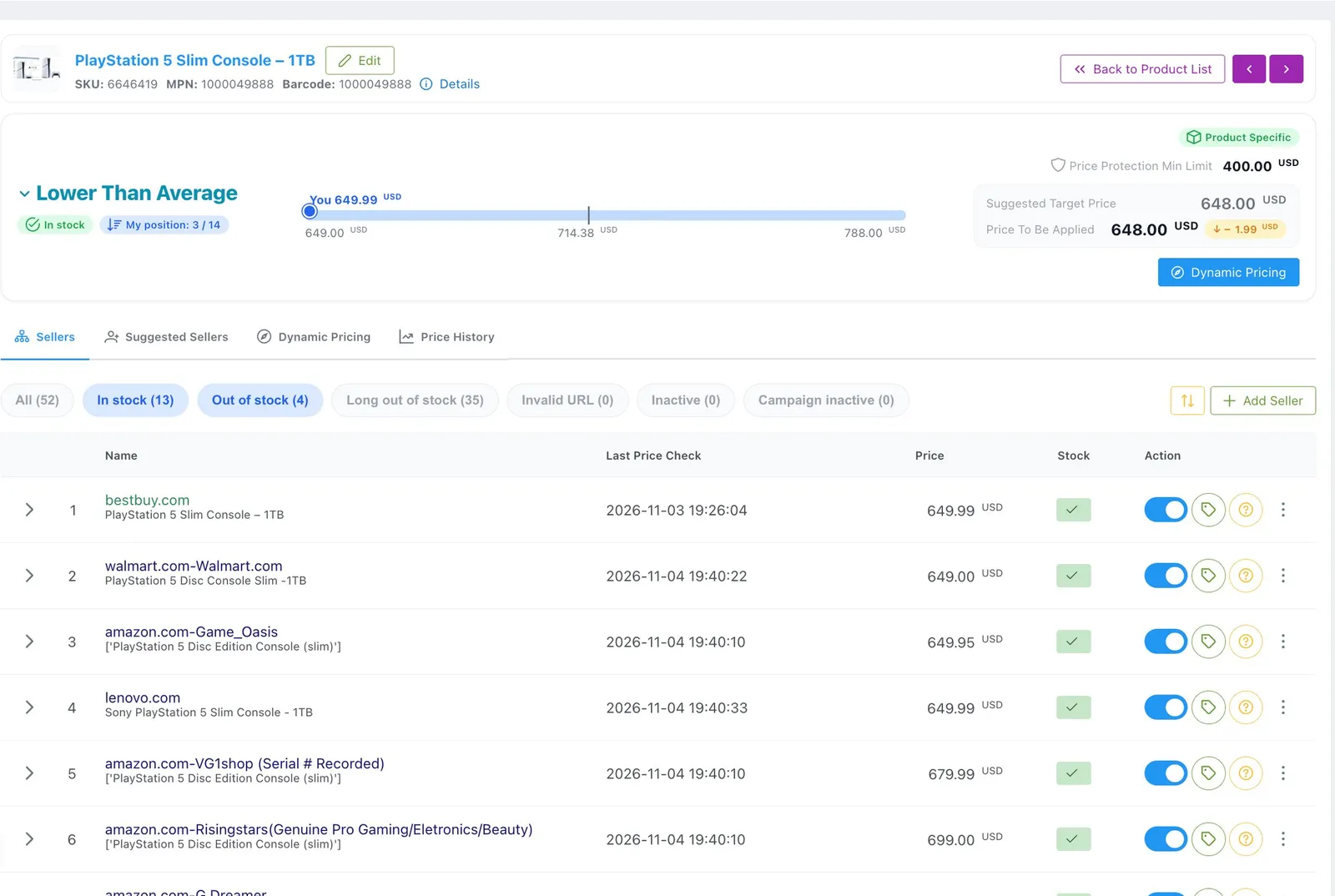
- You may be comparing fewer offers than the count suggests. In the account we tested, one product listed 52 monitored sellers while only 13 had stock and 35 had been out of stock long enough to count as dormant. Treat a headline count as a watch list, not a comparison set.
What We Tested
We used a vendor-provided demo account; its subscription tier was not disclosed. The account contained five monitored products. A campaign listed 18 competitor websites, with three marked Ready and 15 marked as needing preparation. Listed websites are not necessarily collecting successfully.
We reviewed seller prices and check times, the Matching queue and seller controls, repricing rules and targets, and historical reports alongside a separate product-summary export.
Among the five monitored products was a PlayStation 5 console, which gave us a marketplace listing carrying many competing seller offers.
Our testing covered interface behaviour and exported records. Three questions need controlled trials rather than screenshots: whether matching is accurate across catalogues, whether a suggested price is safe to publish unattended, and whether alert delivery works.
Competitor Price Monitoring
A monitored product page puts several pricing signals together. In the view we inspected, our listed price was $649.99. The competing-price figures showed MIN $649.00, AVG $714.38, and MAX $788.00; a position indicator read 3 of 14, where 14 counts in-stock offers plus yours. Individual entries identified sellers and their quoted prices, with status labels distinguishing offers cheaper or higher than ours.
The minimum seller was Walmart at $649.00, while an Amazon seller appeared at $649.95. Those entries help prioritize checks of nearby or higher-priced offers. The interface also exposed availability and Last Price Check information, so a price could be considered alongside whether the offer remained relevant.
The larger Sellers panel separates in-stock sellers from out-of-stock and long-dormant ones, with status filters to switch between the groups. Entries in the same view can have different check dates.
For a useful competitor price monitoring workflow, start with the visible price distribution, then check availability, freshness, and whether the competing offer is genuinely comparable before acting on it.
Product Matching and Seller Controls
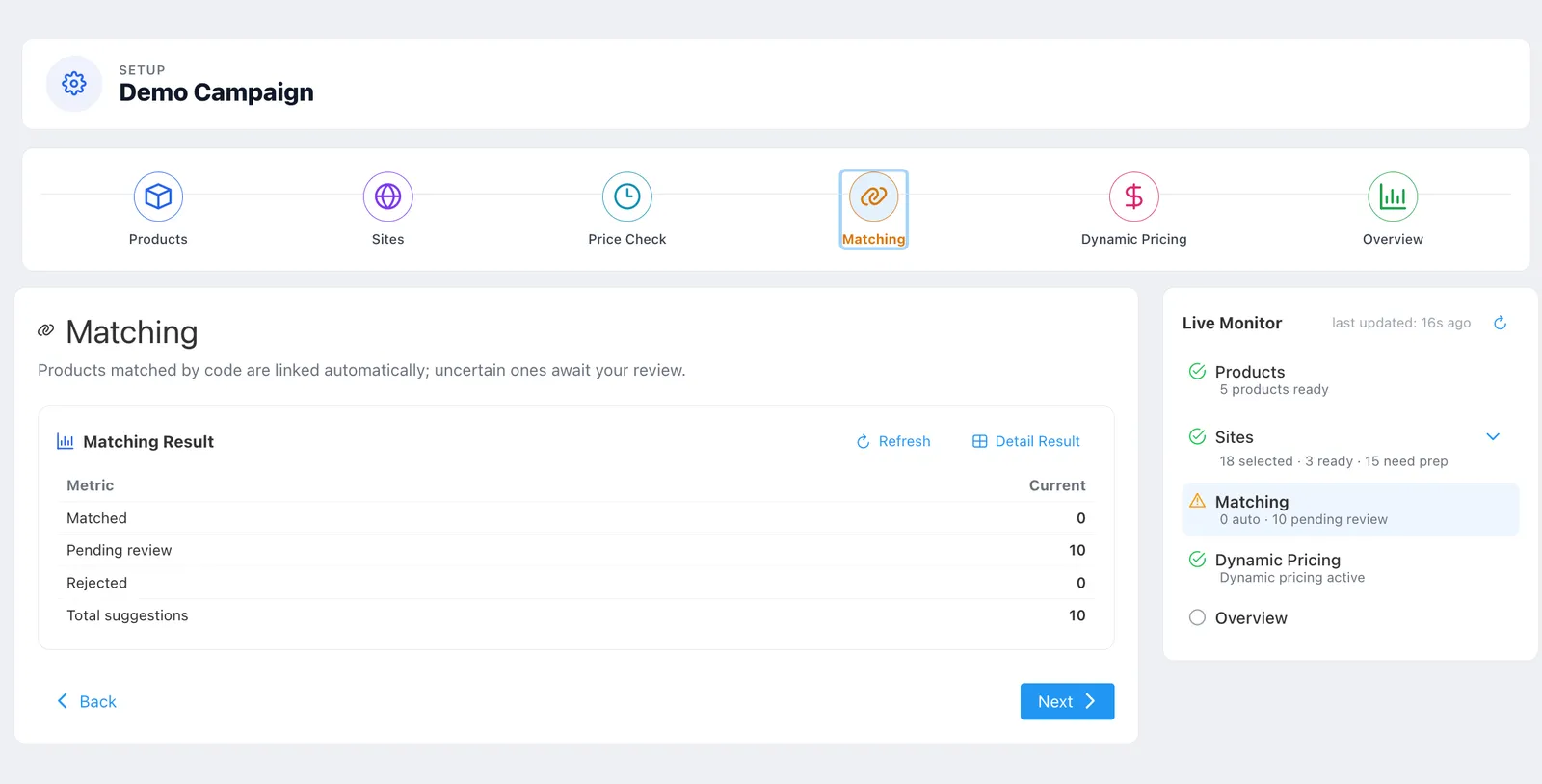
PriceRest presents product matching and seller configuration as related but distinct tasks. The Matching page described code-based associations and a review route for uncertain suggestions. In the campaign we inspected, it showed 0 Matched, 10 Pending Review, and 0 Rejected. These were suggestions awaiting a decision, not a batch of confirmed errors or approved links.
The detailed matching table broke the suggestions down by website and showed fields for total, matched, unmatched, undecided, suggested, and not suggested items. Undecided entries appeared across six websites. This helps locate proposed links needing review.
A separate Amazon Sellers configuration view contained 117 sellers, with an Active control and a Multiplier Coefficient setting for seller-level configuration. Seller configuration differs from deciding whether listings represent the same item. It does not imply 117 available offers for the product.
Review listing identity separately from the seller configuration shaping the price comparison. Teams should distinguish a candidate product match from an enabled seller: those decisions answer different questions and belong in separate checks.
Dynamic Pricing
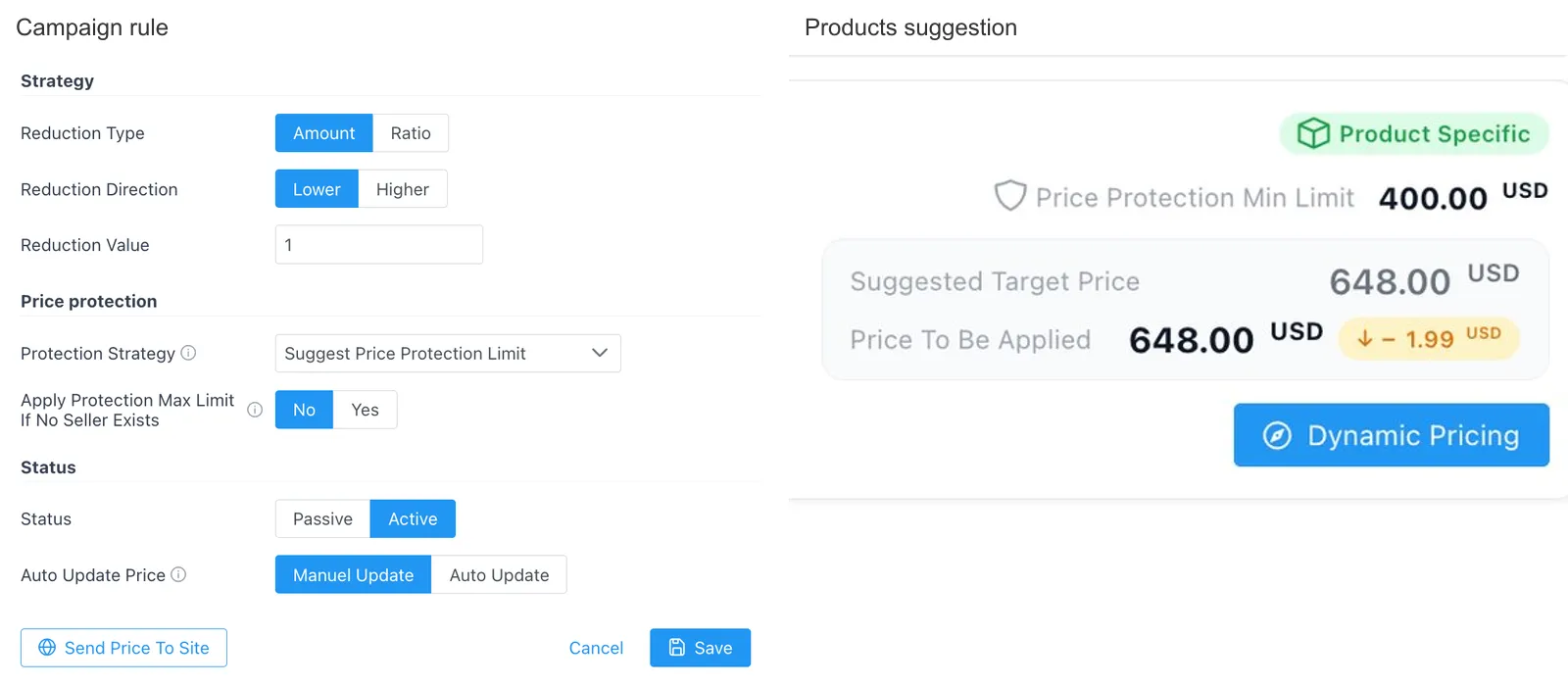
The rule editor made the pricing logic inspectable. A campaign rule included a Reduction Type (Amount or Ratio), a Direction (Lower or Higher), and a value. Our example used Amount + Lower + 1, directing PriceRest to propose a price one dollar below the cheapest competing offer.
The monitored product’s lowest displayed competing price was $649.00; the proposed target was $648.00. Against our listed $649.99, the suggested change was −$1.99. The arithmetic makes the adjustment inspectable before action.
We also saw a product-specific $400 minimum limit, the protection choices Suggest Price Protection Limit, Suggest Optimum Price, and Do Nothing, and a control for applying a maximum limit when no competing seller is available. The interface exposed Manual and Auto update modes, with Send Price To Site shown as a separate action. Our session remained in Manual Update, which allowed the suggestion to be considered as a proposal rather than treated as an instruction to change a live store price.
For a supervised dynamic pricing software workflow, the rule, target, and price floor remain visible for review. The configured $400 limit reflects this demo account, not a recommended limit for another merchant’s margins.
Reports and Exports
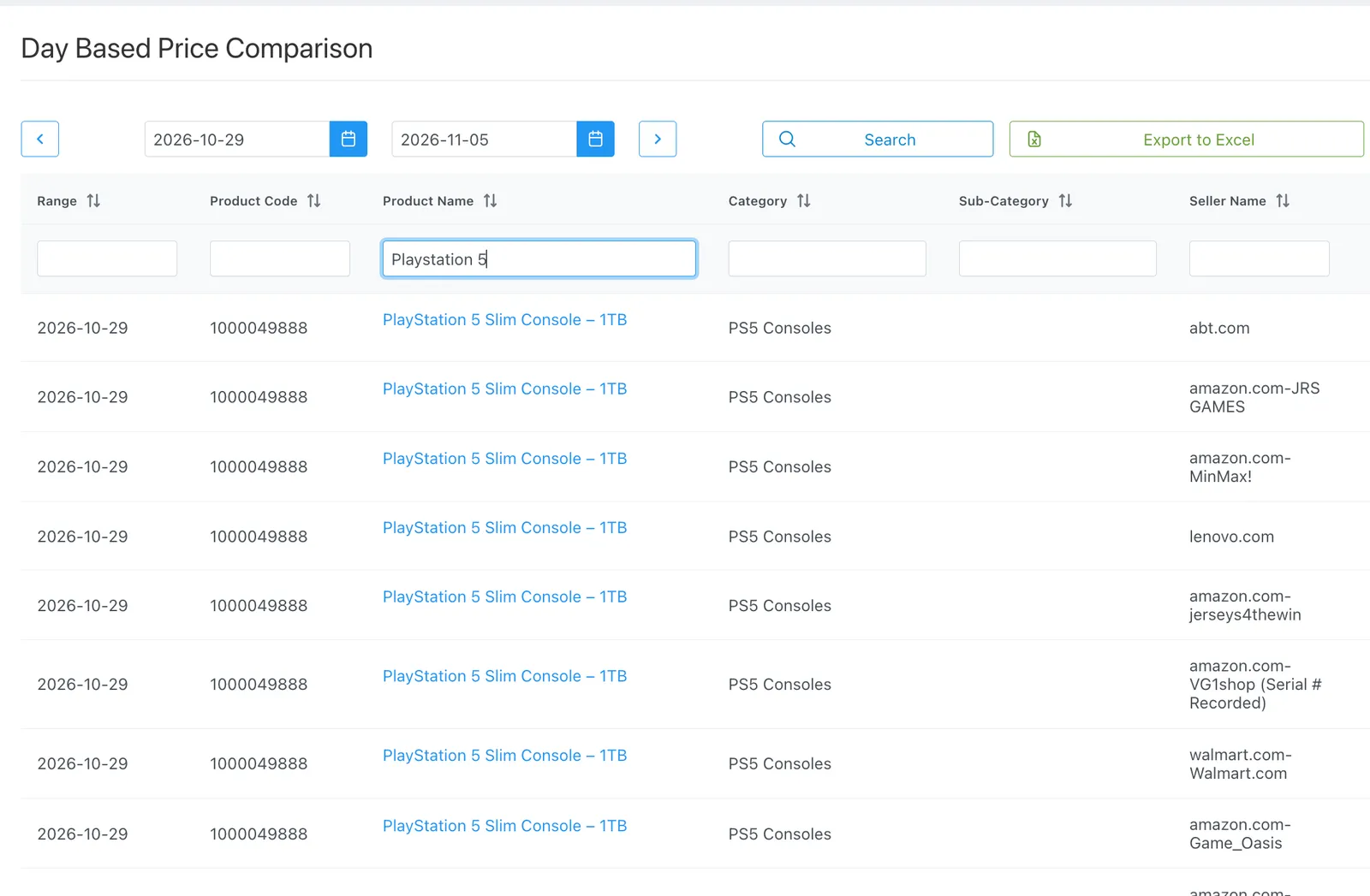
The Day Based Price Comparison report offered a date-range selector, product-name search, filters by product code, category, and seller, paginated results, and an Export to Excel action. Those controls support tracing dated prices rather than viewing only a seller snapshot.
Our export covered October 29 to November 5, 2026, an eight-calendar-day span with records on seven dates. November 2 had no records in the file. That is an export gap, not proof of why records are absent.
The separate Products export served another purpose. It returned a product-level summary with the product price, Sellers’ Min, Name of Sellers’ Min, and Suggested Target Price. The summary captures product-level values; the day-based export supports historical comparison.
Price and stock change reporting also provided event-style records. In the stock-change export, two Amazon sellers moved from a stock value of 1 to 0 at 01:40:10 on November 5, 2026. A column named Total Sale appeared in the export, but its presence is not independent confirmation of a customer purchase. Treat those records as stock-change leads, not verified transactions.
Reports also arrive without opening the dashboard. The account received recurring emails titled “Price Comparison Report” and “Price/Stock Changes”, each carrying the day’s data as an Excel attachment. For a merchant who checks prices once a day rather than working inside the interface, that delivery path matters as much as the screen it comes from.
A Product Condition Finding Worth Checking
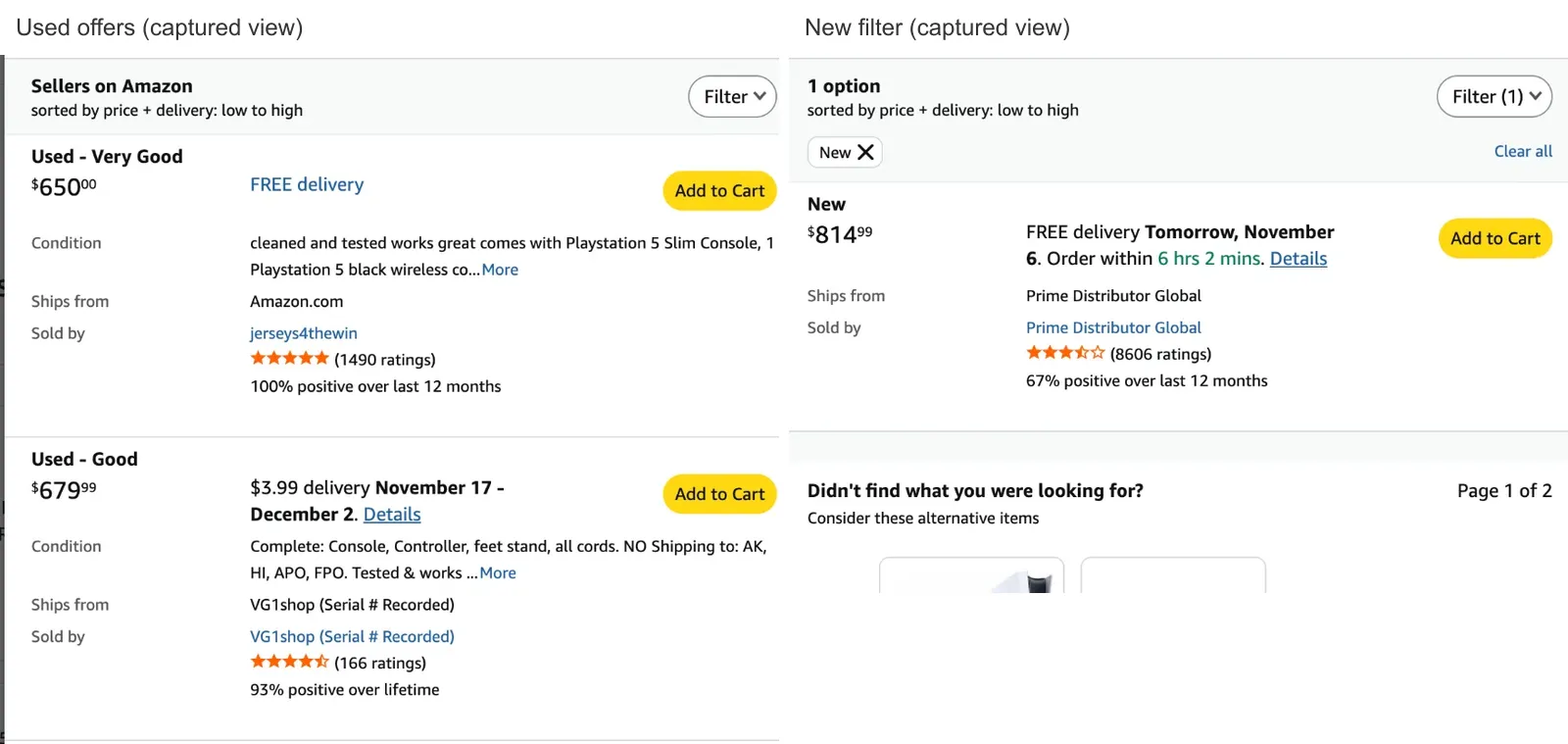
On the Amazon page for that PlayStation 5 listing, three of the visible offers were used: Used – Very Good at $650.00, Used – Good at $679.99, and another Used – Very Good at $699.99. Filtering that page to New left a single offer at $814.99.
In the PriceRest comparison we inspected, seller rows were labeled with seller, price, and status, but not item condition. One seller appeared in both views at $679.99; another appeared at $649.99 in PriceRest and $650.00 in the Amazon capture. The reason for the one-cent difference was not established. A shared listing does not make all offers economically equivalent.
This is not evidence of a matching error. Before using a lowest-price rule for new inventory, a merchant should establish whether the comparison includes used or refurbished offers. Confirm any filter, add-on, or review process before unattended repricing.
How to Configure It Safely
- Define comparable offers. Decide which sellers, channels, models, conditions, and shipping terms are valid competitors before using their prices as a benchmark.
- Set a cost-based floor. Include purchase cost, fees, returns, and the margin you need. Do not inherit the demo account’s $400 floor as a default for your catalogue.
- Start with Manual Update. Review the seller reference and proposed target before considering automatic publication.
- Check freshness and stock. Revisit Last Price Check values and inventory changes, particularly where the lowest quoted offer might have become unavailable. Historical records can complement an inventory optimization process.
Limitations, FAQ, and Bottom Line
This review reflects one vendor-provided demo account of undisclosed tier, five monitored products, and seven dates with exported records. The condition cross-check concerned one Amazon listing. It documents interface and report behavior, not catalogue-wide matching performance or unattended price publication.
Can PriceRest change prices automatically? The configuration offers Manual and Auto modes and a separate Send Price To Site control. Verify connected-store behavior, price limits, and recovery procedures with your catalogue.
How does PriceRest match products? The interface describes code-based links and a queue for uncertain suggestions. Inspect product identifiers and variations before accepting a proposed association; queue visibility alone says little about matching accuracy.
Does it offer price-change notifications? Scheduled reports, yes: two recurring report emails arrived in our account. Threshold alerts and their triggers were not tested.
Can it distinguish new and used offers? Condition was absent from the inspected seller rows. The vendor lists variant tracking as an add-on, but that description alone does not establish how item-condition filtering works. Ask to see the exact comparison behavior you require.
Bottom line: PriceRest is worth a trial if you already compare prices across several marketplaces and will spend an hour configuring rules. It is a poor fit if you expect repricing to work out of the box.
The monitoring view, the match-review queue, the rule editor and the emailed reports all do what they claim. The limits we found are ones you can work around once you know them: offer condition is not shown in the seller row, check times are not simultaneous, and most monitored sellers were out of stock in our account. Set a cost-based floor, start in Manual, and confirm the comparison includes the offers you would actually compete with.
From $49 a month for 100 products, it is priced for a team that will tune it, not for a shop that wants a single toggle.