
What is Microsoft Clarity?
Microsoft Clarity is a free behavior-analytics platform for websites and apps. It combines session recordings, click and scroll heatmaps, conversion heatmaps, segmentation, frustration signals, smart events, and AI-assisted summaries. Ecommerce teams can use it to investigate how shoppers navigate product pages, collections, carts, and landing pages after a quantitative analytics tool has identified a problem.
Clarity is not a replacement for revenue reporting, controlled experimentation, or customer research. It is an observation layer: it helps a team see behavior behind an aggregate metric and produce better hypotheses for design, merchandising, content, and checkout work.
Quick Verdict
Clarity is one of the easiest analytics tools to justify for a small ecommerce store because Microsoft currently provides all features at no cost and does not impose traffic, heatmap, website, or team-member limits. The real cost is operational: privacy review, consent configuration where required, event validation, and staff time spent watching sessions. Install it only when the team has a written question and a process for turning observations into measured changes.
Key Features
- Session recordings: Replay anonymized visitor interactions to investigate friction and unexpected journeys.
- Heatmaps: Review click, scroll, area, and conversion behavior across pages and devices.
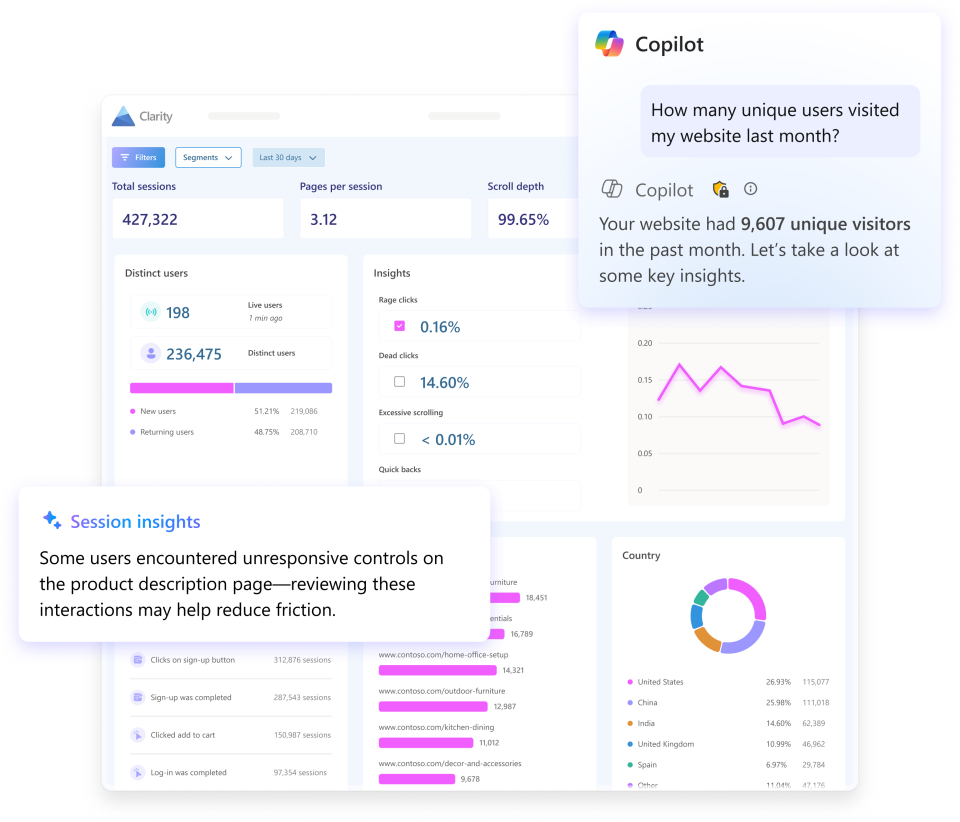
- Frustration signals: Filter for rage clicks, dead clicks, excessive scrolling, and other patterns that may indicate usability problems.
- Copilot summaries: Summarize individual sessions, groups of sessions, and heatmap observations with AI assistance.
- Segmentation: Use more than 40 filters to narrow analysis by device, source, geography, behavior, and other available dimensions.
- Smart events: Track detected or configured interactions without relying only on page-level metrics.
- Google Analytics integration: Connect behavioral evidence with quantitative acquisition and conversion reporting.
Ecommerce Use Cases
- Investigate a mobile product page with high exits or low add-to-cart activity.
- See whether shoppers reach size guides, shipping details, reviews, and calls to action.
- Find broken controls, confusing overlays, dead clicks, and repeated attempts.
- Compare behavior before and after a landing-page, navigation, or merchandising change.
- Collect examples for a conversion-rate optimization brief.
A Practical Evaluation Workflow
- Confirm consent, privacy, masking, and internal-access requirements before enabling collection.
- Define one business question, such as why mobile shoppers abandon a particular product template.
- Create a segment that excludes internal traffic and narrows the device, source, page, or event.
- Review a balanced sample instead of selecting only dramatic sessions.
- Record recurring patterns and separate observation from interpretation.
- Turn the strongest pattern into a testable change with a primary metric and guardrails.
- Use ecommerce analytics or an experiment to measure the outcome.
Best For
Stores of almost any size that need a free qualitative analytics layer, especially teams already using Google Analytics but lacking recordings and heatmaps.
Advantages and Limitations
Advantages
- All current Clarity features are offered free of charge.
- Unlimited heatmaps, websites, traffic, and team members reduce budget friction.
- Recordings, heatmaps, filters, and Copilot summaries support fast investigation.
- The Google Analytics connection helps teams move from a metric to behavioral evidence.
Considerations
- Session watching can become anecdotal and time-consuming without a research question.
- Clarity does not prove that an observed behavior caused a conversion outcome.
- Privacy, consent, masking, and access controls still require review.
- AI summaries can accelerate triage but should not replace checking the underlying sessions.
- Free software still creates implementation and maintenance work.
Pricing
Microsoft currently describes Clarity as free forever, with no traffic limits and no paid upgrade requirement. The pricing page lists unlimited heatmaps, websites, and team members. Stores should still budget for implementation, privacy review, analytics governance, and the staff time needed to analyze findings.
Our Take
Install Clarity when the store has a specific decision to improve, not simply because it is free. A weekly investigation routine that connects one funnel anomaly to recordings, a documented pattern, and a measurable change will create more value than collecting months of unused sessions.
Primary Official Sources
Product and pricing scope were checked against the official Microsoft Clarity website and Clarity pricing page.
Frequently Asked Questions
Is Microsoft Clarity really free?
Yes. Microsoft currently states that all Clarity features are free, with no traffic cap or paid upgrade requirement.
Does Clarity use AI?
Yes. Copilot can summarize sessions, groups of sessions, and heatmaps, while machine-learning features help surface behavioral insights.
Does Clarity replace Google Analytics?
No. Clarity is strongest as a behavioral complement to quantitative analytics, not as the sole source for ecommerce revenue and attribution reporting.
Editorial method: Official product, documentation, help, and pricing pages establish documented capabilities and commercial terms. Vendor performance statements are not treated as independent evidence, and ATFE did not run a controlled comparative hands-on test. Last reviewed: September 2026. Verify current features, limits, privacy requirements, pricing, and contract terms before purchase.