

Mcfly Analytics is a Shopify analytics app for merchants who want to read historical sales, customer cohorts, recorded product costs, and optionally entered ad spend in one place. This Tool Detail review explains what its documented calculations use, where it differs from Shopify’s existing reports, and what a merchant should verify before paying for it.
What Is Mcfly Analytics?
Mcfly Analytics reads Shopify sales and order data to present customer-value cohorts, repeat purchasing, historical sales comparisons, and cost-aware measures. Merchants can also type, paste, or upload daily ad spend to calculate Total ROAS and acquisition-cost views. It does not require a storefront attribution pixel for this documented workflow, and it is not a click-level or multi-touch attribution platform. Mcfly’s product explanation and the Shopify App Store listing describe the available inputs and reports.
The distinction matters because Shopify Analytics already offers customer cohort analysis, retention views, and amount-spent-per-customer measures. Mcfly’s potential value is the way it packages particular cohort milestones, cost assumptions, optional spend, and multi-year comparisons for a recurring merchant decision—not the invention of cohort analytics for Shopify.
Quick Verdict
Mcfly is worth a controlled trial if your team wants to review customer value, repeat buying, contribution-margin assumptions, and several years of sales in a compact operating view. It is less suitable if the main purchase requirement is automated ad-account syncing, campaign-level credit for conversions, or a profit number that requires no cost maintenance.
This is an early-stage app, listed as launched in September 2026. As of the October 2026 fact check, its Shopify App Store listing showed no public reviews. That is a maturity and evidence limitation, not a judgment about product quality. ATFE has not conducted a hands-on or controlled comparative test, so the recommendation below is conditional on your own data checks.
Key Features
- Customer cohorts and LTV milestones: The vendor groups buyers by first-order month and displays value per customer at 30, 60, 90, 180, and 365 days. Younger cohorts are not treated as finished observations. The input is Shopify order history, not a new customer-tracking pixel.
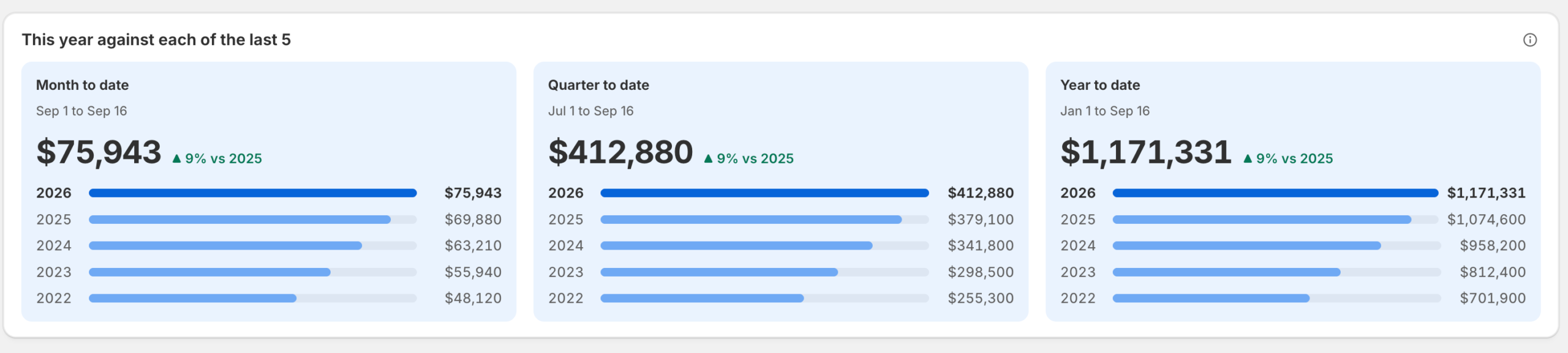
- Historical sales comparison: The app presents day-level sales over up to five past years, while its order-level customer history is described separately as up to two years. Do not assume every report has the same historical depth.
- Contribution margin and break-even CAC: These views combine Shopify sales and recorded product costs with merchant-configured shipping and payment-fee assumptions. Missing costs can change whether a figure is shown or estimated.
- Optional spend and Total ROAS: Merchants enter spend manually or by CSV/Excel upload. Mcfly divides Shopify sales on covered days by that entered spend; it does not import platform attribution claims or identify which ad caused an order.
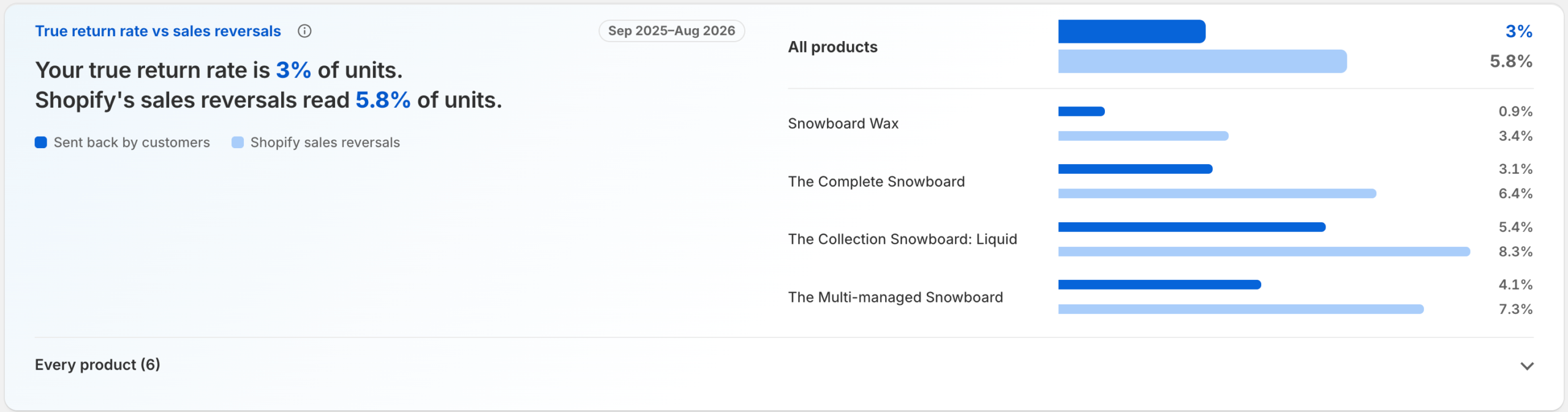
- Returns and sales-reversal context: The product distinguishes physical returns from broader sales adjustments. The labels and denominator should be checked against the merchant’s Shopify reports before a return-rate decision.
- Goals and pacing: A monthly sales target and recent sales pace support a projected finish and spend-planning view. These are planning calculations, not a forecast ATFE has validated.
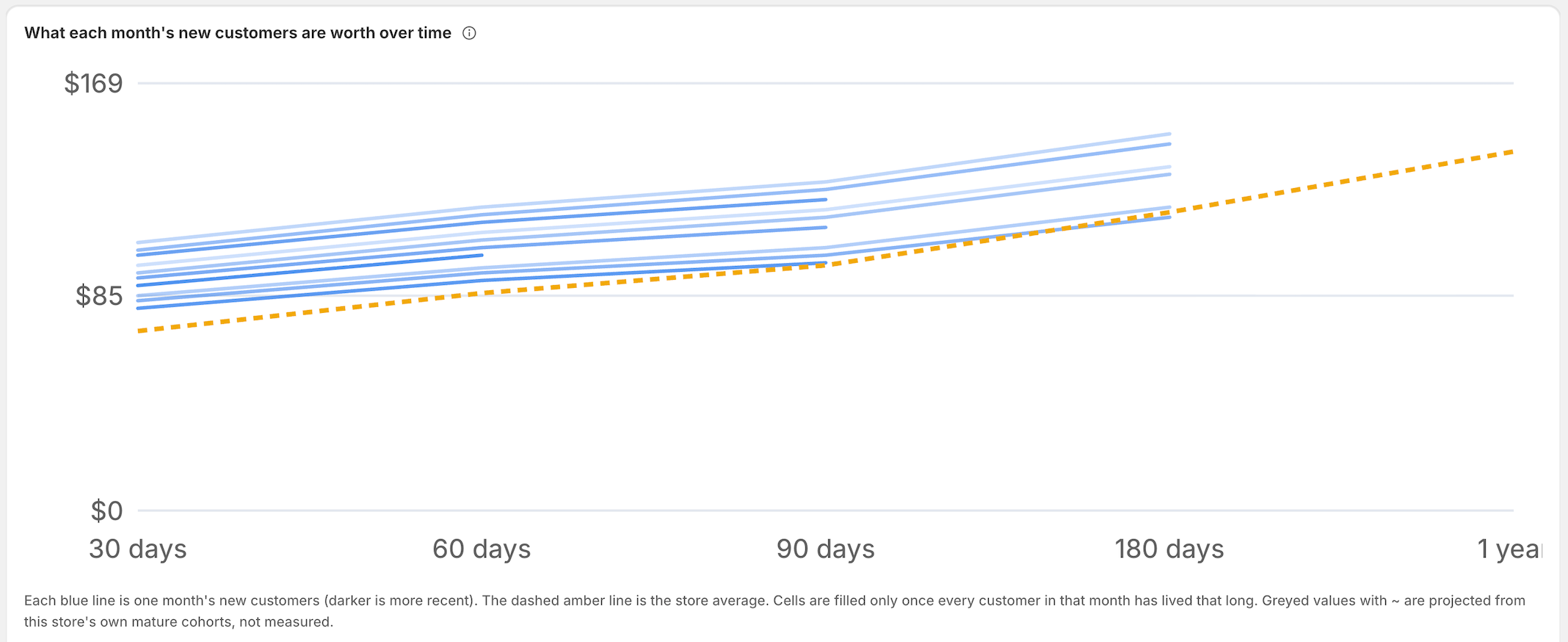
The screenshot above is from Mcfly’s public Sample shop demo and uses invented data. Its blue lines illustrate customer value by first-order month; projected values are not measured merchant results.
What Does Mcfly Add Beyond Shopify Analytics?
Shopify’s own Customer cohort analysis report already groups customers by first purchase and can show retention and amount spent per customer. The useful question is whether Mcfly’s arrangement of specific milestones, costs, spend, and historical comparisons helps your team make a decision faster or more consistently.
| Decision area | Shopify already provides | Mcfly documents | Merchant still needs to verify |
|---|---|---|---|
| Customer cohorts | First-order cohorts, retention, and amount spent per customer. | 30/60/90/180/365-day value milestones and payback views. | Definitions, cohort maturity, date range, and agreement with the store’s existing report. |
| Historical sales | Sales reports and configurable date comparisons. | Side-by-side daily sales views across up to five past years. | Store time zone, refund timing, and whether the view supports an actual planning task. |
| Costs and spend | Sales and available product-cost data in Shopify reporting. | Contribution-margin assumptions, optional entered spend, Total ROAS, and CAC-related views. | Cost coverage, configured shipping/payment assumptions, complete spend days, and metric definitions. |
For sales reconciliation, Mcfly says its Overview compares its stored sales with Shopify reports. That is a documented product feature, not independent proof that either system will always agree. Compare the same shop-local dates and metric definitions in your own store. Shopify’s sales-reversals change is one reason to avoid treating every order adjustment as a physical return.
How the Numbers Are Calculated
Mcfly’s calculation notes separate day-level Shopify sales totals from order-level customer views. The vendor says daily sales comparisons can reach five years back, whereas the order import used for customer and cost views covers up to two years. Its reconciliation view also uses ShopifyQL sales totals; differences can arise when a refund is recorded on the refund date in one report and attributed back to the original order in another.
Contribution margin is not accounting net profit. Mcfly defines it as net sales plus shipping charged, minus product cost, assumed shipping cost, and payment fees. The product cost is the cost Shopify recorded for the item; where costs are absent, the vendor describes a configurable product-margin fallback and coverage labels. Rent, payroll, other overhead, and every merchant-specific expense are not automatically represented by that formula. A merchant should inspect both the input coverage and the assumptions before using the figure to set acquisition limits.
Total ROAS is a blended ratio, not attribution. According to the vendor, it is Shopify sales for days with entered spend divided by the spend entered for those days. A blank spend day is not silently changed to zero, and partial coverage can suppress some CAC and payback figures. A typed zero represents an actual zero-spend day. These safeguards are vendor-documented behavior, not an ATFE-tested guarantee. The ratio cannot establish which channel caused a sale, multi-touch credit, or incremental return.
For cohort value, the vendor says observed milestones appear only after the full cohort has reached the relevant age; projected values, where shown, are distinguished from completed values. During a trial, keep observed, estimated, and projected figures separate in any decision memo.
Best For / Consider If
Best for: A Shopify operator with a specific weekly analytics question, usable order history, reasonably complete product costs, and a willingness to maintain ad-spend data if CAC or Total ROAS matters. A trial is most useful when the operator can name the decision that the new view should improve.
Consider if: The store has little history, sparse or unreliable cost records, or no owner for recurring spend uploads. Also consider another category of tool if you require automatic ad-account connectors, click-level attribution, or extensive enterprise data controls that are not documented here. Read the app’s permissions and privacy terms before connecting a store with sensitive governance requirements.
Pricing and Trial
At the October 2026 source check, both the Shopify App Store listing and Mcfly pricing page described a free plan and four paid monthly tiers: Starter at $29 for up to 3,000 orders, Growth at $59 for up to 15,000, Pro at $119 for up to 100,000, and Enterprise at $249 for up to 500,000 orders per month. Both sources listed a seven-day free trial for paid plans. The free plan covers sales and historical comparisons but presents LTV, cohort, profit, and goals features as upgrade previews; the vendor says every paid plan includes every feature.
These are current public terms, not a permanent quote. Pricing and trial terms can change. Before installing, compare Mcfly’s current pricing page with its Shopify App Store listing. If they differ, confirm the applicable terms with the vendor before selecting a plan. Confirm how your store’s monthly order count and any plan changes are handled in the billing flow.
Data Access and Privacy Questions
Mcfly does not require a storefront attribution pixel for its documented analytics workflow. That does not mean the app processes no customer or order data. Its privacy policy says it stores opaque order and customer identifiers, order amounts and dates, customer-history aggregates, merchant contact details, and optional uploaded spend. It says it does not build a customer name/email CRM from store orders and describes separate service emails to merchant contacts.
The Shopify App Store’s data-access panel currently lists permissions involving customer, order, and report data and describes potentially sensitive customer and device/activity data within the access categories. That is a permission disclosure, while the vendor’s privacy policy describes its stated use and storage; neither should be casually substituted for the other. Before installing, inspect the live permissions and policy, ask about any access your organization does not expect, and review your own governance requirements. ATFE makes no privacy-law compliance or security-certification judgment.
A Practical Evaluation Checklist
This is a merchant-run pilot, not a test ATFE performed.
- Pick one decision. For example, decide whether a mature customer cohort justifies a revised acquisition-cost ceiling. Record the current decision method before installing.
- Reconcile the baseline. Compare total sales and order counts with Shopify for identical dates, time zone, refunds, and definitions. Investigate differences instead of accepting a “matches” label at face value.
- Audit the inputs. Check which products have a recorded cost, the shipping-cost and payment-fee assumptions, and whether enough history exists for the cohort milestone you need.
- Compare mature cohorts. Set Mcfly’s completed cohort marks beside Shopify’s existing cohort report. Explain definition differences before treating a gap as an error or advantage.
- Test spend maintenance. If CAC or Total ROAS matters, upload representative daily spend, identify missing days, estimate the weekly upkeep, and verify that no unentered day is treated as zero.
- Review one operating cycle. Ask whether the combined view changed a real decision, made it easier to explain, or simply replicated existing reporting. Record the staff time and subscription cost needed to keep it current.
Our Take
Mcfly is a reasonable trial candidate for a Shopify merchant who wants a compact view of customer value, historical sales, cost assumptions, and optional blended spend. The strongest purchase case is not “more analytics”; it is a demonstrably better recurring decision with inputs the team can maintain. If Shopify’s existing reports already answer that question, or if your real need is automated attribution, the extra app may add cost without solving the intended problem.
The app is new, its public review base was empty at this fact check, and ATFE has not independently tested production-store accuracy, reliability at scale, or support quality. Treat the pilot as the evidence-gathering step, not as confirmation of the vendor’s claimed outcomes. Browse the site’s AI Analytics Tools category if your required workflow points to a different analytics approach.
Primary Official Sources
Product scope, terms, and permissions were reviewed against the Shopify App Store listing, the vendor’s how-it-works page, calculation notes, pricing page, privacy policy, and public Sample shop demo. Shopify’s customer reports documentation and sales-reversals changelog establish the relevant native-report context.
Editorial disclosure: Mcfly Analytics was submitted to ATFE by its founder, and vendor-provided information was used as a research lead, not as independent validation. ATFE did not conduct hands-on testing or receive evidence sufficient to verify real-merchant performance. No paid placement determines this assessment. Mutable product facts were last checked in October 2026 and should be checked again before purchase.
Frequently Asked Questions
Does Mcfly replace Shopify Analytics?
No. Shopify already has sales and customer-cohort reporting. Mcfly presents additional combined views and vendor-defined calculations that may or may not improve a merchant’s workflow. Keep Shopify’s native reports available for reconciliation.
Does Mcfly use a storefront pixel?
The vendor says its documented analytics workflow does not require one. The app still accesses and processes Shopify order and customer-related data according to its current permissions and privacy policy.
How does ad spend get into Mcfly?
The vendor describes typing, pasting, or uploading daily amounts from CSV or Excel exports. It does not describe automatic ad-account login or a click-level attribution connector in this workflow.
How much history is available?
The vendor distinguishes up to five years of day-level sales comparisons from up to two years of order-level data for customer and cost views. Check the actual history available to your store during a trial.
Is contribution margin the same as net profit?
No. Mcfly’s formula includes sales, recorded product cost, and configured shipping/payment assumptions. It does not automatically include every overhead or accounting adjustment.
Is there a free plan?
Both official pricing sources listed one at the October 2026 check. The free tier provides selected sales and historical views; the full cohort, profit, and goals tools are paid-plan features. Recheck the live plan details before installing.
Are there independent user reviews?
The Shopify App Store showed no public reviews at the October 2026 check. That can change and does not establish product quality. Check the current Shopify App Store reviews before making a purchase decision.