
AdsTurbo gives ecommerce teams two ways to start a video ad: turn a product page into a concept, or use an authorized reference video to guide a new variation. We tried both with a gold bedside lamp. Quick Ads produced a coherent first draft with a small text error. Ad Clone borrowed some useful scene ideas from our reference, but neither of its two outputs represented the lamp's physical design closely enough for us to run as a product ad.
If you need ideas for a product video, AdsTurbo is worth trying. If the precise shape of your product is part of the buying decision, plan to inspect and revise the output before you publish it. This review covers three generations with one product. Our separate AdsTurbo tool profile covers the broader product.
Disclosure: AdsTurbo provided a limited number of credits at no cost for this review.
What AdsTurbo does
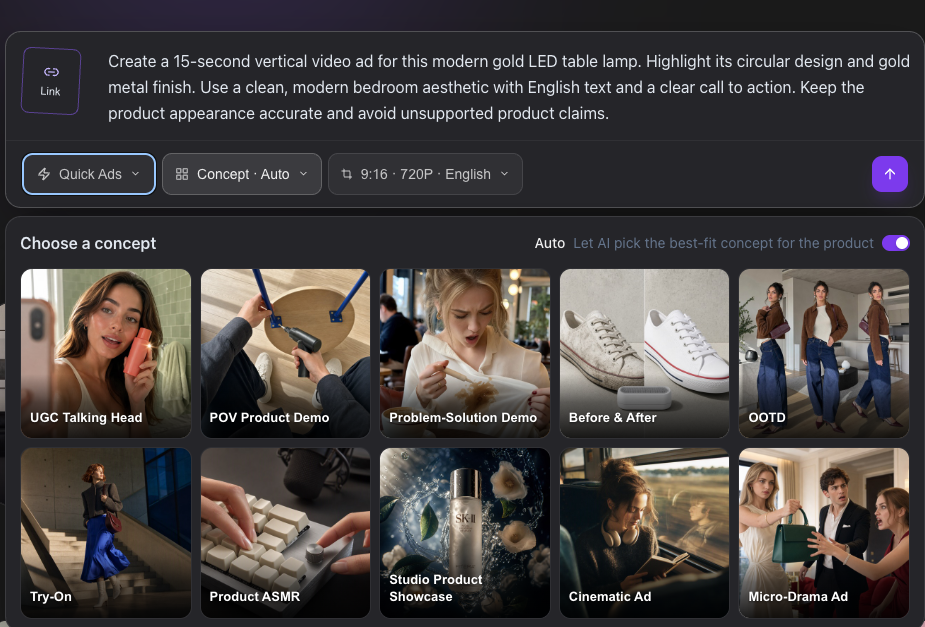
URL to Video takes a public product link, extracts listing details and images, and lets the user review those details before choosing a video concept. AdsTurbo then generates a short ad for review. We used its Quick Ads workflow with a product link and chose a Studio Product Showcase concept.
Ad Clone starts with a video the user owns or is permitted to use. The user selects a segment, reviews an AI-generated description of its style and structure, edits the prompt, and can attach product or scene images before generating a variation. This is a different creative starting point: a team can explore the visual rhythm of a reference without building every scene description from scratch. It still needs rights to the source material and a review of the finished ad.
For a small ecommerce team, the appeal is the shorter route from existing product assets to a video concept. The relevant question is how much work remains between that concept and an ad the team can approve.
What other users say
G2 currently shows two AdsTurbo reviews, too few to establish a reliable overall satisfaction picture. One reviewer, identified by G2 as an organic current user, likes the structure AdsTurbo brings to creative planning and iteration, while noting a learning curve for advanced options. Another praises the reference-to-editable-prompt workflow and warns that outputs need checking; G2 labels that reviewer a business partner of the seller or its competitor and excludes the review from its score. Those comments add context to our test, but they cannot predict the result for a particular product.
The three outputs at a glance
| Run | What worked | What needed attention |
|---|---|---|
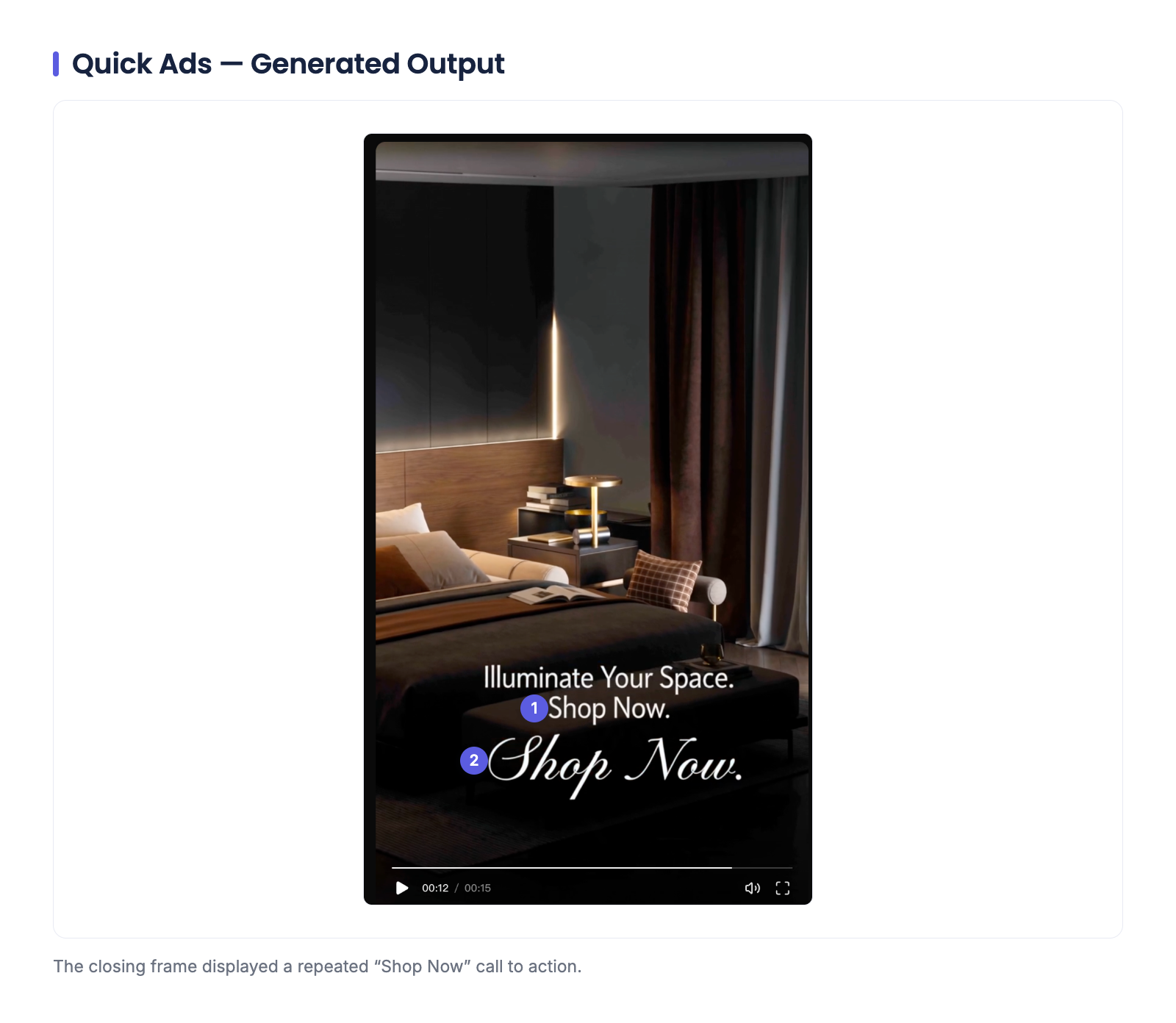
| Quick Ads, one generation | A recognizable bedroom setting, lamp close-ups, and a clear progression to the closing frame | The closing frame showed "Shop Now" twice; we did not check every frame for product accuracy |
| Ad Clone, first generation | The reference influenced the bedroom mood, framing, and parts of the shot order | The lamp's physical structure changed |
| Ad Clone, second generation | Product 1 image could be attached and named in the scene instructions; the result had appealing close-ups | The lamp's existing cylindrical component moved and changed proportions |
We judged creative direction, visible product details, and on-screen copy. We did not run the clips as ads or measure clicks, sales, or return on ad spend. The sample is too small to estimate how often any particular error occurs.
Quick Ads gave us a workable concept
We entered the lamp's product link and requested a 15-second vertical Studio Product Showcase video in English. The brief called for its rounded shape and gold finish in a contemporary bedroom. The generated sequence moved through close-ups and a lit bedside scene before ending on a call to action. The lamp was broadly recognizable in our initial viewing. We did not compare every frame with a full set of product photos, so we would still check its details before using the clip.
The ending needs a simple correction: "Shop Now" appears twice. It does not erase the value of the concept, but it is exactly the sort of detail a merchant should catch before publishing. We would also review any product claims and the full-resolution frames, then decide whether this version is worth editing further.
Ad Clone carried the reference's mood, but changed the lamp
For the first Ad Clone attempt, we selected an approximately six-second segment of a reference video. AdsTurbo described it in an editable scene prompt. The generated clip picked up aspects of the bedroom atmosphere, camera framing, and shot sequence. That made the reference useful as a creative brief. The lamp itself was less dependable: its structure in the output did not match the product closely enough for this clip to advertise the SKU accurately.
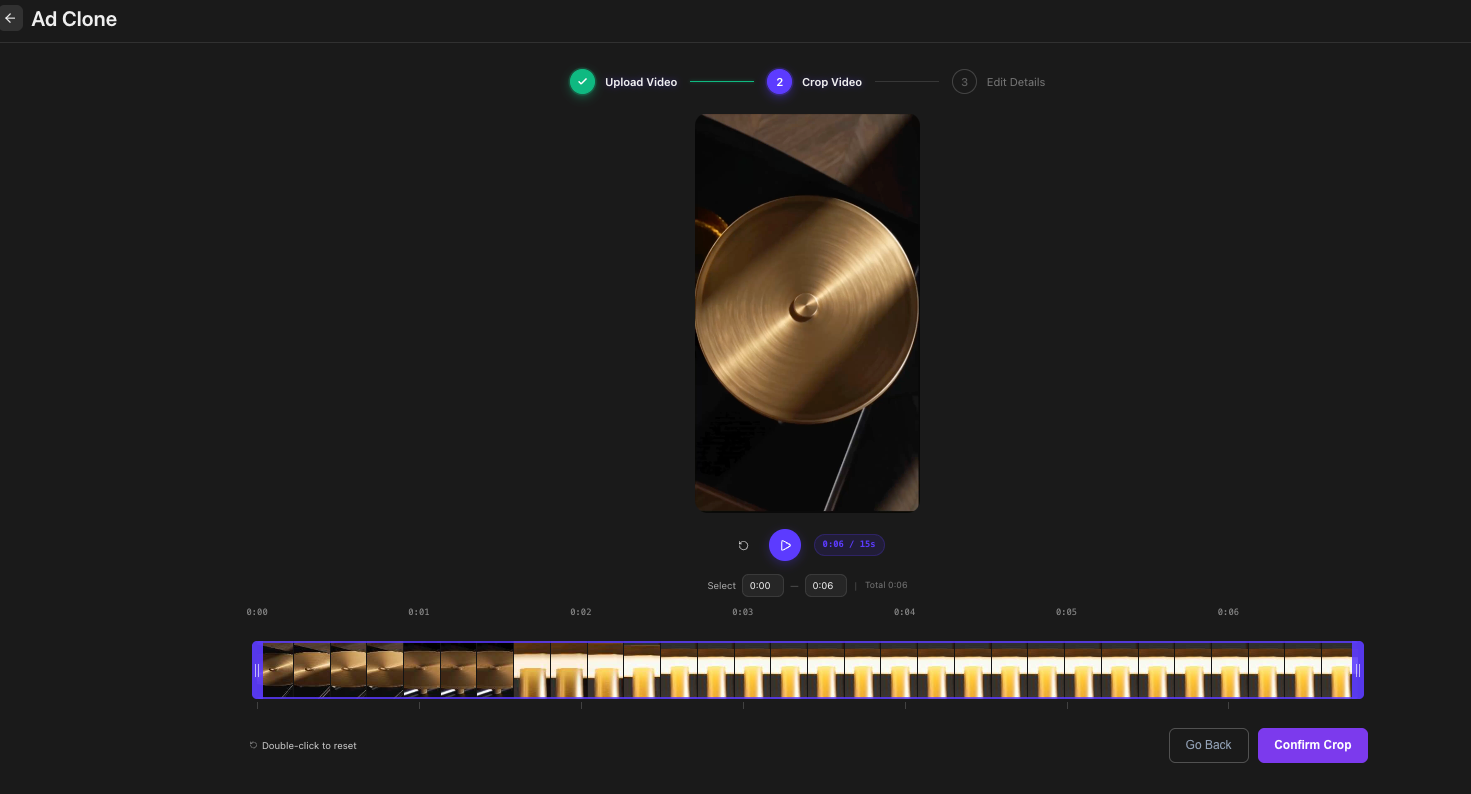
We had shortened and accelerated the source material. That makes this attempt a poor test of how naturally Ad Clone handles ordinary pacing. We also did not ask for a closing call to action, so we do not count its absence as a fault.
For the second attempt, we added a real image of the lamp as Product 1. The editor showed that image attached, with five scene descriptions referring to it. This gives a merchant a more specific way to describe the product than relying on the video reference alone.
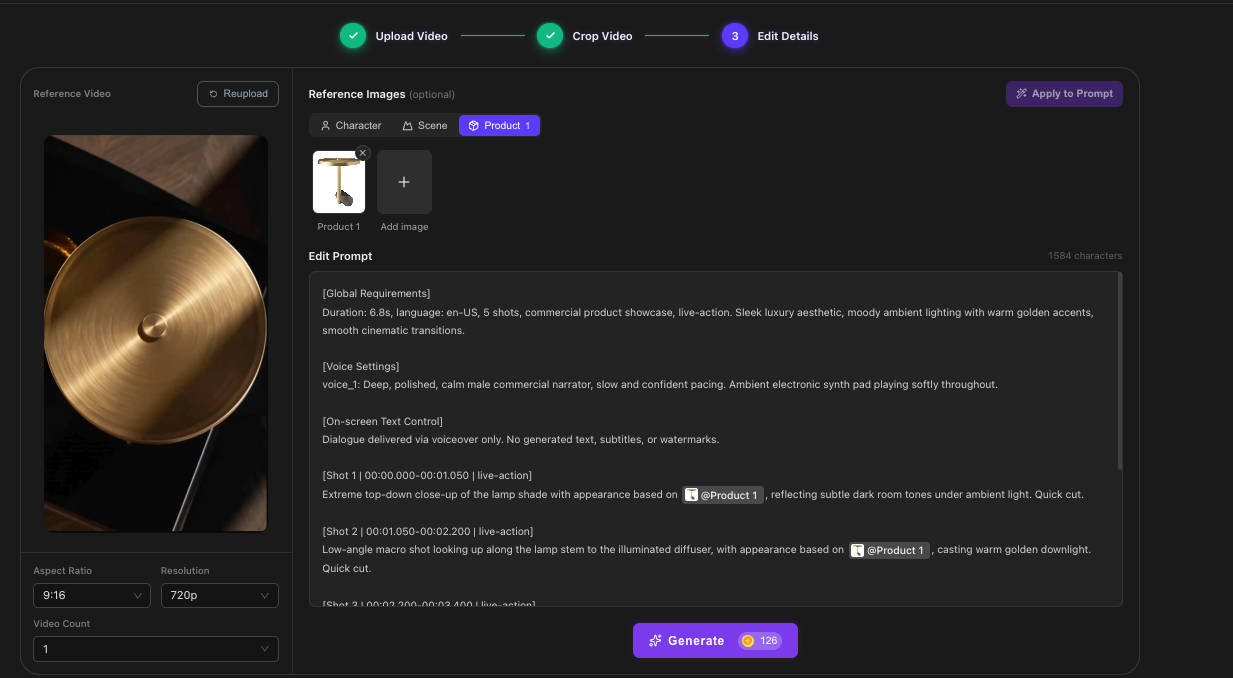
The follow-up had attractive close-ups and a plausible bedroom scene. Around three seconds in, though, the lamp's horizontal cylindrical component appeared partway up the vertical stem. Its proportions, silver end, and connection differed from the real lamp. The original product does have a cylindrical component; the problem is where and how the generated video placed it.
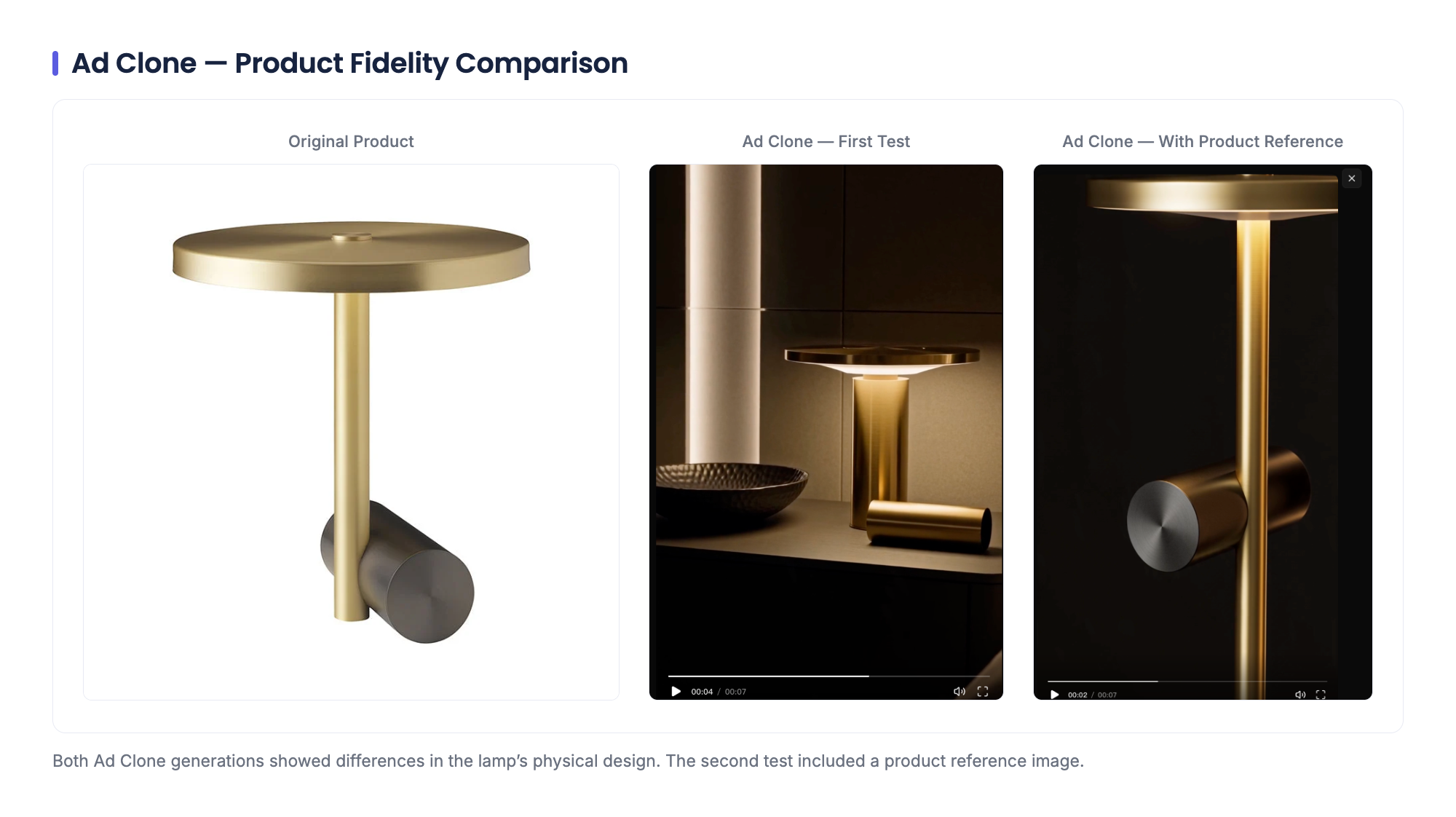
We cannot isolate why the second generation missed the geometry. The reference image, scene wording, and setup changed together, and we do not have the complete final submitted prompt. The narrower finding is that attaching a product image did not solve this particular problem in our follow-up run.
Why another round may be worthwhile
Revising a generated video is ordinary creative work. AdsTurbo's Ad Clone guide tells users to edit the prompt and inspect each result. Runway's prompting guide recommends iterating on the prompt and input image; HeyGen's Video Agent help likewise describes adjusting a result or editing a copy. These vendors describe ways to revise outputs; their guidance does not tell us which product would reproduce our lamp more faithfully.
The practical distinction is between a fixable draft and a finished product ad. For this lamp, we would try clearer side and base photos, name the stem-to-base connection in the editable prompt, and inspect the affected frames after another generation. We have not run that next attempt, so we cannot promise it would fix the shape.
How does AdsTurbo compare with Creatify?
Creatify is a relevant alternative to investigate, but we did not test it with this lamp. Its documentation describes both URL-to-Video and Ads Clone through AdFlow. The latter can use an existing ad or supported link as a reference and offers editing controls for product visuals, script, branding, captions, and calls to action. AdsTurbo documents product-link generation and an Ad Clone flow with a selected segment, editable prompt, and optional reference images.
| If your team needs… | What to examine in AdsTurbo | What to examine in Creatify |
|---|---|---|
| A first ad from a product page | Whether the chosen concept gives you a usable draft with accurate SKU details | Whether its URL-to-Video output gives you a usable draft from the same page |
| A variation based on an authorized reference | How well Ad Clone transfers the desired scene structure without changing the product | How AdFlow's Ads Clone handles the same reference and product assets |
| A fast path to approval | The generations and edits required to reach an acceptable result | Its documented editing controls and the work required on the same brief |
We compared documented workflows, not output quality. Use the same product, reference rights, review criteria, and output requirements if you trial both. Vendor feature lists alone cannot tell you which tool will need less editing on your product.
Should you try AdsTurbo?
Try it if your team wants product-ad concepts or variations from an authorized reference and has time to review the result. Quick Ads gave us a starting concept we could work with. Ad Clone made the reference's visual direction visible in a new clip, even though our two versions did not preserve the lamp well enough to use as accurate product ads.
If your product has distinctive geometry or details that cannot change, make fidelity an explicit approval check. Compare frames with your SKU photos, read every caption and call to action, and count the rounds of revision needed to get one acceptable video. AdsTurbo might still fit the workflow, but our three generations do not establish that it will produce a publishable ad on the first attempt. Check its current pricing and usage terms for the settings you plan to use.
How we tested
ATFE made three generations in Oct 2026 with one gold bedside lamp: one Quick Ads output and two Ad Clone variations. We assessed creative direction, visible product structure, and on-screen copy. The complete final prompt for the second Ad Clone run was not preserved. We did not test audio, other products, other AdsTurbo features, or campaign performance. We did not test Creatify hands-on. Vendor documentation supports feature descriptions; our observations apply only to the runs described here.
Fact-checked Oct 2026.